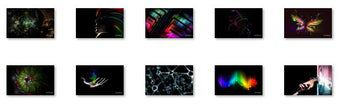

Download Dark Abstract Windows 7 Theme – Windows 7 theme, abstract desktop, dark wallpaper, high-resolution background, desktop customization
Overview
The Dark Abstract Windows 7 Theme is a desktop customization tool designed for users of Windows 7 seeking a modern, artistic aesthetic. This theme transforms the standard desktop interface into a visually engaging environment through a curated set of high-resolution abstract backgrounds. It addresses the common desire for personalization by offering a sleek, dark-themed experience that enhances visual appeal without compromising system performance. The primary purpose is to elevate the user’s daily computing experience by introducing a sense of sophistication and individuality to the desktop space.
Target users include individuals who value design, digital artists, and professionals who spend extended hours at their computers and wish to create a more immersive or calming visual environment. The theme is particularly well-suited for those using widescreen monitors, as it is optimized for 1920 x 1200 resolution, ensuring clarity and detail across various screen sizes. While the developer is listed as "Dark Abstract Windows 7 Theme," no further organizational or company background is available.
Real-world use cases include personalizing home or office workstations, enhancing the visual identity of creative projects, or simply refreshing a familiar interface with new artistic content. In the broader app ecosystem, this theme holds a niche but meaningful role as a lightweight utility that supports user expression within the constraints of an older operating system. Despite its age, the theme remains relevant for users still relying on Windows 7 for stability, compatibility, or legacy software support.
Key Features & Functionality
- Visually Striking Designs: The theme features abstract, dark-themed backgrounds with flowing shapes and gradients, creating a minimalist yet dynamic visual effect. These designs are ideal for users who prefer a calm, focused workspace with artistic undertones.
- High-Resolution Images: Each background is rendered at 1920 x 1200 resolution, ensuring sharpness and clarity on modern widescreen displays. This resolution supports both desktop and laptop monitors without pixelation or distortion.
- Ten Unique Backgrounds: A diverse selection of ten distinct abstract images allows users to rotate or switch themes based on mood, time of day, or project focus, promoting a personalized and adaptive desktop experience.
- Easy Installation: The theme is designed for straightforward deployment. Users can apply the entire set with minimal steps, making it accessible to both novice and experienced users of Windows 7.
- Windows 7 Compatibility: Specifically built for Windows 7, the theme ensures stable integration without requiring additional software or system modifications, reducing the risk of conflicts or instability.
For example, a graphic designer might use the theme to maintain a distraction-free workspace while drawing inspiration from the abstract visuals. A remote worker could change the background daily to reflect different work modes—calm for deep focus, bold for creative brainstorming. The simplicity of switching between backgrounds supports flexible, mood-driven workflows.
Interface, UX & Performance
The Dark Abstract Windows 7 Theme does not include a traditional user interface, as it is a system-level customization package. Instead, its interaction occurs through the Windows 7 Personalization settings, where users select and apply the theme from a list of available options. The visual style is consistent across all backgrounds: dark color palettes with subtle gradients and geometric abstraction, promoting visual harmony and reduced eye strain during long sessions.
Navigating the theme’s application is intuitive, relying on standard Windows 7 interface conventions. Users can preview each background before applying it, and the system handles the rest automatically. Although the developer did not list formal performance metrics, the theme’s lightweight nature—28.5 MB in size—suggests minimal impact on system resources. It does not include background processes, animations, or services that could affect responsiveness.
Performance is expected to be stable on devices running Windows 7 with standard hardware configurations. Responsiveness during theme switching appears to be immediate, as no processing overhead is introduced. Stability is maintained through compatibility with the operating system’s native theming engine, reducing the likelihood of crashes or visual glitches.
Platform Compatibility & Technical Requirements
The Dark Abstract Windows 7 Theme is designed exclusively for the Windows 7 operating system. It is not available for other platforms, including newer versions of Windows, Android, or iOS. The software version is 1.0, and the file size is 28.5 MB, which is relatively small for a theme package containing ten high-resolution images.
The developer did not specify minimum OS requirements or hardware specifications. However, given the theme’s compatibility with Windows 7 and its modest file size, it is likely to function on systems with standard configurations, including older desktops and laptops. No additional software or dependencies are required for installation or operation.
Pros and Cons
- Lightweight design with minimal system impact
- High-resolution backgrounds optimized for widescreen displays
- Easy one-click installation via Windows 7 Personalization
- 10 unique abstract images for varied visual expression
- Specifically built for Windows 7, ensuring compatibility
- Not compatible with Windows 10 or later operating systems
- No additional interactive features or dynamic elements
- Developer information not publicly available
- Theme is static—no animations or live updates
- Released in 2012, indicating no recent updates or support
FAQ
Is the Dark Abstract Windows 7 Theme free to download?
Yes, the theme is available at no cost. It does not require a purchase or subscription for access or use.
Can I use this theme on Windows 10 or Windows 11?
It is specifically designed for Windows 7. While some users may attempt to install it on newer systems, compatibility is not guaranteed and may result in errors or improper display.
How do I install the theme?
Installation involves downloading the package and applying it through the Windows 7 Personalization settings. Users can select the theme from the list of available options and apply it directly to their desktop.
Does the theme require internet access to function?
No, once installed, the theme operates offline. No internet connection is needed to view or switch between backgrounds.
Are the background images animated?
No, the images are static. They do not include motion, transitions, or dynamic effects.
Final Thoughts
The Dark Abstract Windows 7 Theme delivers a focused, elegant solution for users seeking to refresh their desktop environment with artistic flair. Its minimalist design, high-resolution visuals, and seamless integration with Windows 7 make it a reliable choice for those who value aesthetics without complexity. While it lacks modern features like dynamic updates or interactive elements, its simplicity is its strength—offering a distraction-free, visually appealing interface with minimal overhead.
It remains particularly valuable for users still operating on Windows 7, whether due to software compatibility, hardware limitations, or personal preference. The ability to personalize the workspace with ten distinct abstract backgrounds supports individual expression and enhances daily computing satisfaction.
For anyone looking to elevate their Windows 7 experience with a sleek, dark-themed aesthetic, this theme provides a straightforward and effective upgrade. Download Dark Abstract Windows 7 Theme now.


